Skills
A Skill is a named bundle that groups related Tools and injects a skill-level description into an agent’s system prompt. Assigning a skill to an agent gives it all the tools in that bundle plus additional context about when and how to use them.
Role in the configuration model:
Agent
  ├── 1 Persona  →  WHO the agent is
  ├── N Skills   →  named capability bundles  ← this page
  └── M Tools    →  individual executable functions
See Tools and Personas for the other two building blocks.
Skills page (/skills)
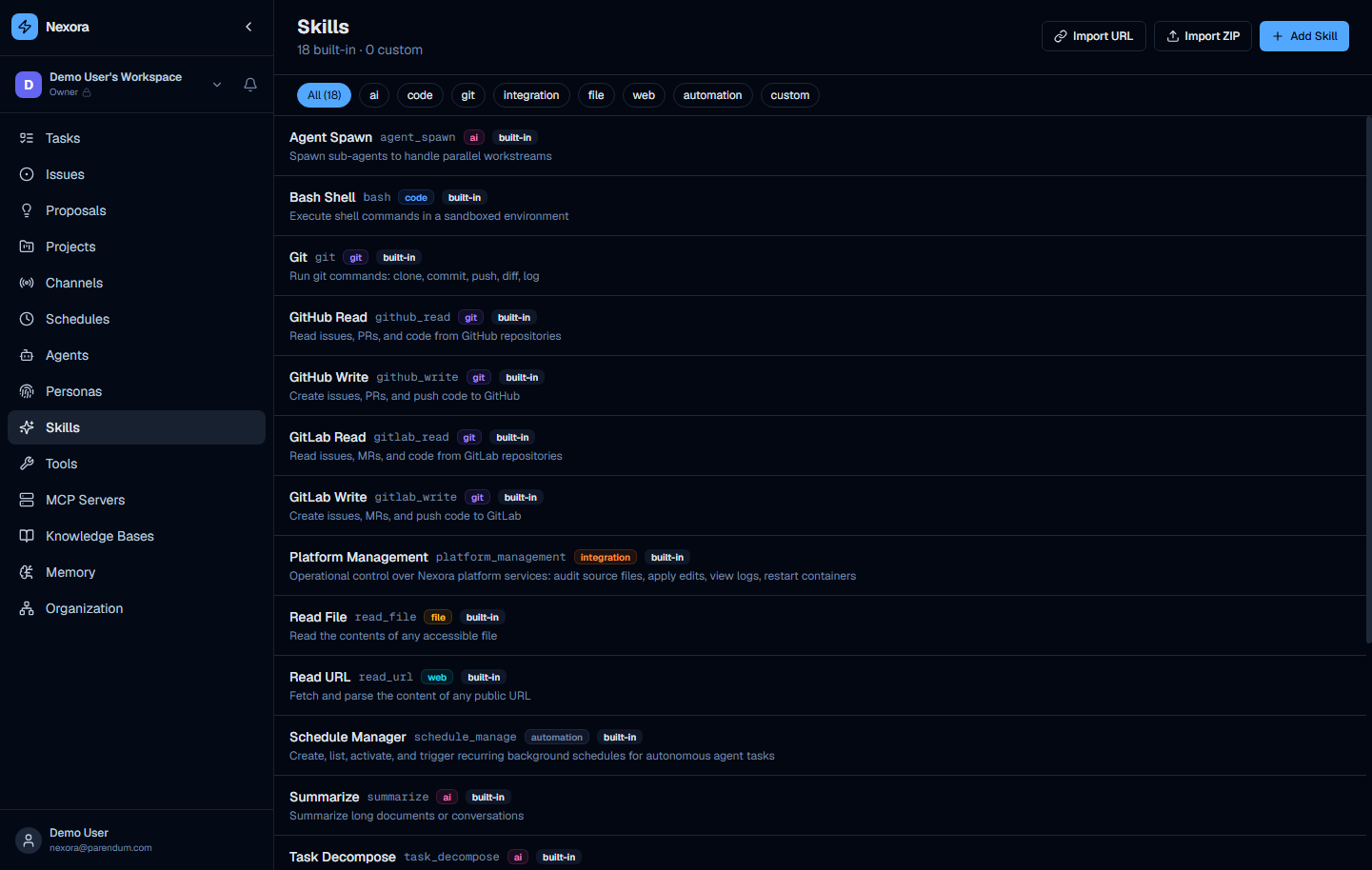
Header shows “Skills” with subtitle “15 built-in · 0 custom” (the counts are live). Three buttons top-right:
- Import URL — import a skill from a marketplace import link
- Import ZIP — import a packaged custom skill from a
.zipfile - Add Skill — open the creation form
Category filter chips
| Category | Skills |
|---|---|
| All | All 15 |
| ai | Agent Spawn, Summarize, Task Decompose |
| code | Bash Shell |
| git | Git, GitHub Read, GitHub Write, GitLab Read, GitLab Write |
| integration | Platform Management |
| file | Read File, Write File |
| web | Read URL, Web Search |
| automation | Schedule Manager |
| custom | User-created skills |
Skill card anatomy
Each card shows: name · ID badge (e.g. agent_spawn) · category tag · built-in badge · description.
Built-in skills
ai
Agent Spawn (agent_spawn)
Spawn sub-agents to handle parallel workstreams. Enables an agent to create and dispatch specialised child agents at runtime, collecting and synthesising results. Core skill of the Project Manager agent.
Summarize (summarize)
Summarize long documents or conversations. Condenses chat history, documents, or external content into concise output.
Task Decompose (task_decompose)
Break a complex objective into a structured sequence of discrete, assignable tasks. Used by orchestrating agents when planning multi-step work.
code
Bash Shell (bash)
Execute shell commands in a sandboxed environment. Gives the agent the ability to run arbitrary shell commands, install packages, compile code, and inspect the filesystem.
Bash Shell grants significant system access. Only assign it to agents used by trusted operators. Review the shell sandbox configuration in your deployment settings.
git
Git (git)
Run git commands: clone, commit, push, diff, log. General-purpose git skill for repositories not hosted on GitHub or GitLab.
GitHub Read (github_read)
Read issues, PRs, and code from GitHub repositories. Read-only — safe to assign broadly.
GitHub Write (github_write)
Create issues, PRs, and push code to GitHub. Requires a GitHub token in Settings → Integrations.
GitLab Read (gitlab_read)
Read issues, MRs, and code from GitLab repositories. Read-only.
GitLab Write (gitlab_write)
Create issues, MRs, and push code to GitLab. Requires a GitLab token in Settings → Integrations.
integration
Platform Management (platform_management)
Operational control over Nexora platform services: audit source files, apply edits, view logs, restart containers. Used exclusively by the Infrastructure Manager agent.
Platform Management provides write access to Nexora source files and the Docker daemon. Assign only to dedicated DevOps agents used by admin-level operators.
file
Read File (read_file)
Read the contents of any accessible file from the host filesystem within the agent’s permitted path scope.
Write File (write_file)
Create or overwrite a file on the host filesystem within the agent’s permitted path scope.
web
Read URL (read_url)
Fetch and parse the content of any public URL. Retrieves web pages, REST API responses, or any public HTTP resource.
Web Search (web_search)
Run a web search and return ranked results for the agent to ground its answers on current information.
automation
Schedule Manager (schedule_manage)
Create, list, activate, and trigger recurring background schedules. Powers the Scrum Master agent’s automated standup and sprint planning capabilities.
Creating a custom skill
Click Add Skill and fill in:
| Field | Description |
|---|---|
| ID | Slug for API references (e.g. stripe_billing) |
| Name | Display name (e.g. Stripe Billing) |
| Category | Existing or new category name |
| Description | What this skill does and when an agent should use it |
Tools are not bundled in the create form — assign them to the skill after creation, or build the skill as a marketplace package.
Importing from ZIP
Click Import ZIP to upload a packaged skill. The ZIP contains a skill definition JSON and associated tool definitions — the standard distribution format for community-contributed skills.
Decision guide
| Goal | Layer to modify |
|---|---|
| Give an agent a new named capability | Create a Skill and assign it |
| Bundle several related tools for reuse | Create a Skill |
| Add a single new API call | Create a Tool directly |
| Change how an agent communicates | Modify the Persona |